Overview
The traditional method of recording results relied upon someone filling
in a score sheet by hand and posting it to an administrator who collated
all the league data.
Clearly we have moved on a long way since those days, as being able to
enter results online has made the whole process much simpler for all
concerned.
However, it does not tackle the issue of accuracy of result. Regardless
of whether the results are initially recorded on a score sheet or not,
by the time someone comes to enter the results online, actual points may
be wrong or a player name wrongly written down.
One major step forward is for teams to add their players to a Player or
Nomination list from which the players in a match can be selected. This
has a number of other advantages which are discussed in the Players and
Nominations guide but they include accurate identification of players.
The other important stage in ensuring accurate results, is to use the
Full Score Entry System.
Full Score Entry
By using Full Score Entry you can provide a framework in which
individual game scores can be entered in a structured way. Not only does
this allow calculation of results and points, but it also ensures that
the scores are accurately and clearly displayed.
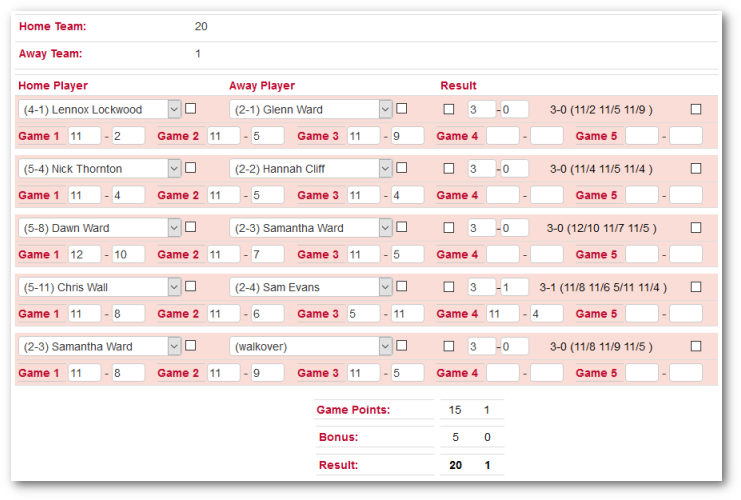
Note that in the above example (from the league administrator screen,
not the club screen), the individual game scores have been
used to calculate the overall points, the individual player
results are calculated from the game scores, and the total overall
points are calculated from the player scores and the preset bonus.
When saving the match, League Master will run a number of checks and if
any errors are found, the Data Entry Error section will appear
underneath the game entry box, and will show relevant comments:
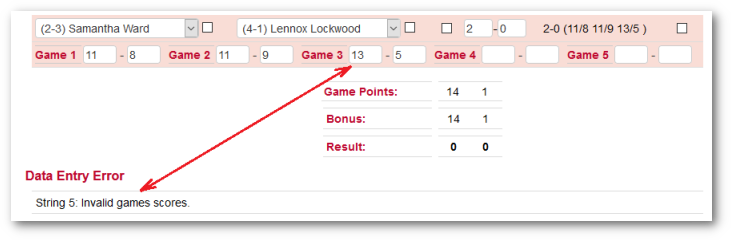
Note that 13-5 is not a valid score if using PAR 11, as shown in the
above.
If any errors are found, then the Points will not be added and the
fixture will not be deemed ‘entered’.
Settings
Apart from the actual scoring system being used, and bonus points, there are two main options available:
Allow Blank
Under normal circumstances, a 5 player match, for instance, must have a
result for all 5 players. However, in a social or relatively informal
match, you might want to record scores accurately but allow less than
the designated number of players.
In this case, you can set the system to ‘Allow Blank’ and you do not
need to enter either player.
Even if using Allow Blank, and entering no players, you can still enter
a result for the string by using the Games Only option below.
Blank To Walkover
This is only vailable if Allow Blank is disabled.
When a team enters a string result, and leaves one of the players blank,
the system will automatically save this as a walkover.
This makes no difference to the overall score, but can be used by the
League Monitoring System to automatically award a penalty for any
walkovers. (Many leagues penalise teams if they do not turn up with the
full number of players).
Missing Players
The assumption is that all players and results will be entered (unless
using Allow Blank above). Quite apart from needing all the scores to
calculate the overall points, there is a general concept of
‘completeness’ which most leagues will want to adhere to.
However, in the case of a walkover, this might not be possible.
If it was a player from the team that is entering the result that was
given the walkover, then no problem because they can select one of their
own players who would have played, and then select '(walkover)' for the
opponent.
However, if it was one of their own team who did not play, then they may
not know which player from the opposing team drop-down list to use. The
only way round this is for the entering team to contact the opponents
and ask which player would have played.
Of course, the team captains on the night should have sorted out this
situation at the time, so that the above issue would not arise.
(While this might seem like a lack of flexibility, you can't have it
both ways. You can't try and restrict teams to ensure accurate results
but at the same time, allow them to put in phantom results.)
Another alternative is that the team contact an administrator who can
either find out who the opponent was on their behalf, or who has other
administrative options.
Player Walkovers
Under normal circumstances, a valid set of game scores must be entered.
However, if a player has been given a walkover - there was no opponent –
then this can be recorded too. The team should enter the player who was
deemed to have won and then record their opponent as ‘(walkover)’. Any
player game scores are ignored and the overall score is recorded as 3-0.

However, they can also enter a walkover in this way:

While they may seem equivalent ways of registering a walkover, they have
different interpretations.
In the first case it is obvious that it was a match that was not
actually played, whereas in the second case, Guy could genuinely have
won 9-0, 9-0, 9-0; there is no way of knowing.
There is no way of League Master knowing if the second case was valid or
not, and this is why the (walkover) option is available in the player
selection. You should ensure that all teams are aware of what they
should do in case of a walkover.
Note:
In the first case, Squash Levels will know to ignore the match, whereas
in the second case, it will treat it as a genuine result and their
resulting change in level will be unmerited.
Administrative Override
For a club or team login, the above requires that "a player is given a walkover". You cannot give a walkover to nobody. So even if the walkover was given in advance, and there was no one to actually give the walkover to, the player that would have been given the walkover must be recorded. The team entering the result will usually realise that without a player no overall points are awarded, and add a player.
However, if no players are recorded and you want to this result to count, then login as administrator, and you then have the facility to tick an override box and enter the scores manually without needing players or specifically setting either was '(walkover)'.

Where one team forfeits the whole match and the match is not played, then the club entering the result simply puts in all the strings as walkover.
Note: Exactly the same issues arise here as with the individual walkover above, so by using the administrative login, you can set all strings to a win without needing to add any players.
Correcting Errors
Note: This is only available using the super login.
The ability to add a 'walkover' is the only ‘correction’ option available
to the clubs.
However, there are a number of situations where errors need to be
corrected or other situations allowed for.
Override
Where an ineligible player has played (obviously depending upon the
rules of the specific league), the conventional method is for an
administrator to set the relevant game score to 3-0 and adjust the
overall points accordingly.
However, setting the score to 3-0 and the individual games to 9-0, 9-0,
9-0 might be correct in terms of the corrected overall match points, it
does not reflect the actual result between the two players who in
reality played what at the time was a genuine match.
Also, if the score is changed to 3-0 and there is a dispute, then the
actual score has been lost and may need re-inputting once the dispute is
resolved. However, a greater problem is that if using SquashLevels,
resetting individual scores to 9-0, 9-0, 9-0 does not reflect what
happened and the adjusted rankings will be wrong.
The solution is to override the points calculation. Next to each name is
a tick box. Regardless of the entered game scores, if you tick a player
then as far as calculating the overall points, the ticked player is
deemed to have won 9-0, 9-0, 9-0.

The corrected games are shown in red (0-3 above) while the actual scores are shown beside it.
In this way, Squash Levels will see the actual result and it will be
saved in League Master, but the overall fixture result will be adjusted.
Games Only
There may be cases where the complete games scores have been lost or are otherwise not available but you know that a particular player won.
In this case you can tick the Games Only box and record the game scores:
You do not need to enter player names unless you know them. (This is the
same situation as mentioned above for a single match).
Squash Levels Ignore
If you are linked to SquashLevels (which is the case by default), then
you may wish to exclude a particular string from inclusion where someone
retires injured, for instance.

In the above example, the home player retires injured after the second
game and the scores for the last two games are recorded as 0-11.
While this may be correct, it does not represent a true or fair result
in terms of the ability of each player. Ticking the ignore box shown in
red will
cause the individual string result to be excluded from SquashLevels,
but otherwise the match is recorded as normal.
Adjustments or Penalties
Where individual players are penalised, you should use the above options
to override the result.
However, if a team as a whole need to be penalised, rather than an
individual, or you wish to make some other form of adjustment to the
result, then you can add an ‘Adjustment’ if logged in as an
administrator.
Any value, which can be positive or negative, will be added to the
overall score after the match result has been calculated.
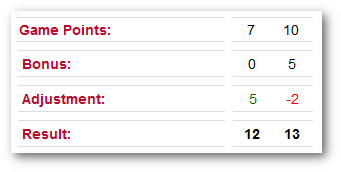
In the example below of the resume shown on the Result page, an
adjustment of 5 extra points was made for one twam and a penalty of 2
points was made for the other: