As far as leagues are concerned, clubs and teams are initially added by League Master as part of the league setup process. However, it is up to the clubs and teams to populate the various fields.
Apart from the standard fields, the following should be noted:
| Team Contact Email | This will be included in Send email to Team Contacts within the emailing system. |
| Default Fixture Day & Time | These values can be used by League Master during the league setup process. |
| Reserve Contact Email | This will be included in Send email to Team Contacts within the emailing system. |
| Results Entry Email | This will be included in Send email to Team Contacts within the emailing system. |
There are also some Additional Functions that are available via the administrative login only:
| First Period Withdraw | This will withdraw the team from the league by resetting all matches to 0-0 result and will lock this team's fixtures. However, all individual player results remain on the system and are included in any rankings, if applicable. |
| Second Period Withdraw | This will withdraw the team from the league by resetting only second half matches to 0-0 result and will lock this team's fixtures. However, all individual player results remain on the system and are included in any rankings, if applicable. |
If a team withdraws before the league is published or before it starts, then completely deleting them from the league is the usual practice, although you must contact League Master to have this done. One of the reasons for this is that if a club has two teams, for instance, and the 1st team withdraw, then you may want the remaining team to become the 1st team.
However, once the league has started, if a team simply disappears,
then it will be confusing for other teams, so using the Withdraw
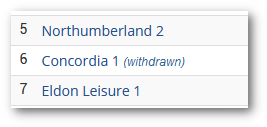
functions above should be used. In addition to resetting fixtures, it
also shows '(withdrawn)' against their name in the division listing:
| Set Team Night | Set ALL fixtures for this team in the current league to the Default Fixture Day and Default Fixture Time set above. If you have just changed those values, please Save Changes before using this function. |