Under normal circumstances, tournament entrants will be added using the online entry process, with the necessary fields - name, email address etc. - determined by the tournament setup.
All entrants can then be seen on the main display:
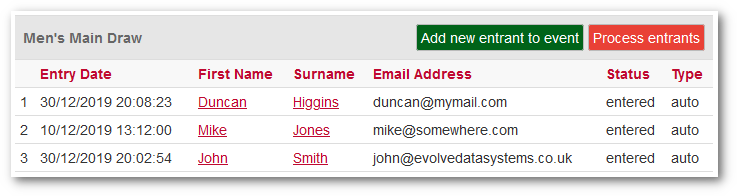
However, you can manually add entrants, something that might be done after the tournament entry has closed, or simply to add entrants who have not used the online entry process.
You can also edit existing entrants by clicking on their name.
Apart from the standard fields, there are some important options to note:
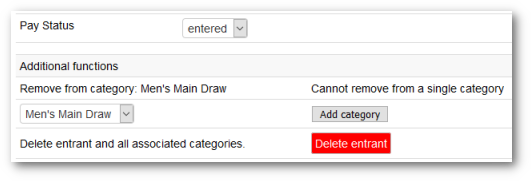
Pay Status
By default, the value of this is "entered".
If you use Online Payment as part of your online entry, then the entrant will be taken to PayPal as part of the process. Assuming that the payment is successful, and the entrant finishes the process by clicking on the PayPal "Return to League Master" link, then League Master will show the Pay Status as "paid".
However, if having been taken to PayPal the payment is not successful, or the entrant does not finish the process by clicking on the PayPal "Return to League Master" link, then League Master will show the Pay Status as "not paid".
The ability for an entrant to successfully make payment, yet close the PayPal page before using the "Return to League Master" link, means that it is possible for the Pay Status to be "not paid" when in fact the payment was made.
|
Another point to note is that even if an entrant does complete the pay process, it does not mean that they have paid the correct amount. If you allow entrants to enter more than one category, then they may enter two categories on League Master but select the payment for just one category in PayPal. |
There is no solution to this, and you are advised to always use the Reconciliation facility to check exactly what payments are made in PayPal and compare these to what should have been paid.
Remove and Add Categories
Entrants often enter the wrong category or after entering, decide to enter multiple categories. You can easily move or add categories using the options provided.
Delete Entrant
This will delete the entrant and all categories they may be entered
into.