Having done the basic setup for Online Entry, you can then use the Online Entry link:

to go the the Online Entry Home Page.
Here you will find a number of links across the top that you will need to check.
Entry Fields
On the entry form that players will use, you can set which fields are visible and which are mandatory for a valid entry. Simply tick the boxes in the Visible and Required columns as required.
Entry Pages
As a player goes through the entry process, they will be taken through a number of stages, each page of which can have custom text.
 |
Tip: You will probably find that all your tournaments will use similar Entry Page text.If you go to the main Tournaments & Events page, click on Tournament Settings and then select Entry Page Defaults, you can set up template text for all pages, and when you create a new tournament, these page settings will be copied over to become your inital settings. |
Main Display
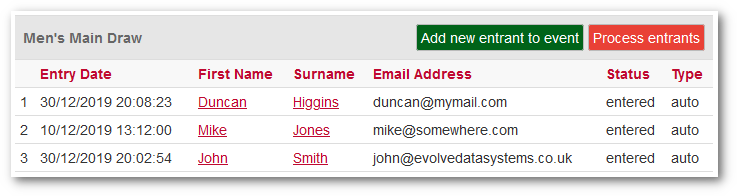
The display shows everyone who has entered the tournament in sections based upon the category they entered.
The columns shown are dependent upon the Entry Fields you have selected (see above) but there are two system columns that are always visible:
Status
This has three possible values:
- Entered: This will be the standard value if no online payment is being made and simply indicates that the entry form was successfully completed.
- Paid: This indicates that the entry form was successfully completed, and also that the online payment was successful.
- Pay Failed: This indicates that the entry form was successfully completed, but that the online payment failed or was not completed.
Type
This has two possible values:
- Auto: The entry was made as part of the normal online entry process.
- Manual: The entrant was added manually using Add New Entrant to Event.
Editing Player
Clicking on the name of a player will bring up the Entrants page.
This allows you to add any extra data that was not initially added,
and also to change the categories that the player is entered into.
Add New Entrant to Event
While the majority of players will be entered via the online entry
process, there will inevitably be those that you need to enter manually,
often because they are last minute entries.