As players enter a tournament, they will appear on the Tournament Entries page:
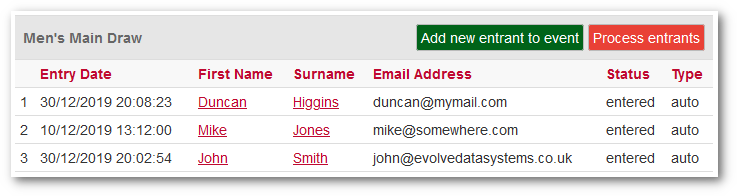
You will probably wish to monitor and manage the entries as they are made.
Maybe players will enter twice, or make other mistakes, and it is good
to deal with problems as soon as possible. But
once the entry has closed, you will need to:
- Check for duplicates
- Add in any extra players who may have been entered separately
Adding players manually can be done via the Add new entrant to event link against the required category.
The aim is to ensure that each category is exactly correct, with no duplicates and contains only valid players. Once you are happy with the entrant list, you will need to carry out two procedures:
- Create the associated event. You cannot process the entrants until you have created the event, so make sure you do this first.
- Process the entrants.
Create Event
You could create the event at the same time as you create the tournament and enable online entry, but there is no need to do so and unless you have a fixed draw size, you cannot create the event unless you know how many players have entered.
Creating an Event
Process Entrants
The ultimate aim of processing entrants is to get them into the draw for a tournament event, and depending upon the type of site you are using, there may already be players in the database that you could use. However, the best solution is to use the Process Entrants function:
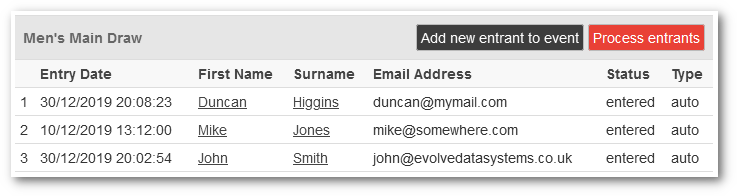
This will bring up a list of all the players in the entry category, in the above example the Men's Main Draw. However there is at this point no direct relationship between the category that a player entered and the name of the event that you will have created. The first thing you must do is select the actual event that these players will be added to:
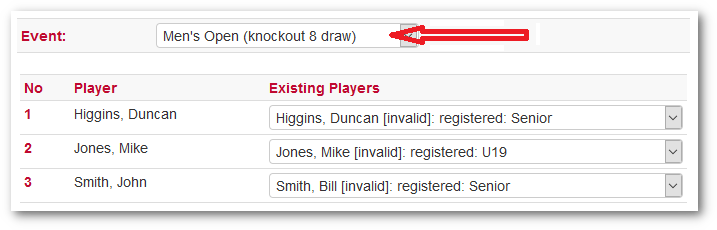
If all appears correct, click Process and all the players will be added to the Player Pool for that event.

 |
Tip: If you make an error, and select the wrong event, or you need to edit the players, you can run Process Entrants as many times as you want for any given Event, as it will simply overwrite any existing players in the Player Pool. |