Every tournament event needs to be populated with first round players, and the players that are shown for selection are determined by the Player Dataset, which is set in the Event setup.
For dedicated tournament sites, there are two options:
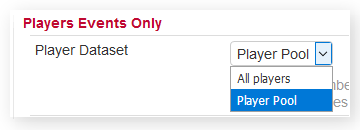
All Players
This, as it suggests, makes every player in the database available for selection in a seeding list and the draw. If you only have a small number of players in your overall list of players, and all the players in the tournament draw are in your list, then using All Players will work fine.
However, as the number of players increases, using All Players makes selection of specific players much more difficult, particularly on a large draw.
Player Pool
The recommended way to handle players in events is to use Player Pools.
Having selected Player Pool, return to the Tournaments & Events home page and you will now see a Player Pool link for the event:

Initially this list will be empty, but it can be populated from the drop-down player selection lists, or by Processing the entrants if using online entry.
A player pool provides several benefits:
- When you populate a draw, only the players in the associated player pool will be shown, so for an 8 player draw, for instance, you will only see 8 players for selection, making the process much easier and you are less likely to make mistakes.
- If you have preliminary or qualifying rounds, or a set of playoffs, then you can use the same player pool for all.
- If using online entry, you can use the Process Entrants function on the Entrants page to automatically populate a player pool from the list of entrants for a specific event.
- Having created a player pool, you can then create an event seeding list using only those players in the player pool.
(For sites that use the concept of clubs and teams, there are additional Player dataset options.)