For most tournaments with online entry, you will set an Entry Deadline, which is shown on the Tournament Details page. Once the deadline is reached, and you are happy to close the entry, you have two choices:
Tick Entry Closed and add some Closed Text.
This will prevent anyone from entering the tournament and you can use the Closed Text to give any useful information as required.
Tick Reserve List Active.
This will allow someone to enter and again, you can set any useful information for them to see. An important part of the Reserve List concept is that the entrant will not be required to pay, assuming you are using online payment. Should a place become available for them, then you will need to take payment separately.
Reserves
Once a player has entered AFTER Reserve List Active has been ticked, they will have a status of 'reserve' and will be highlighted:
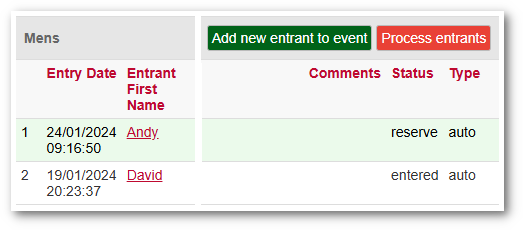
When using Process Entrants, a reserve player will NOT appear in the list of entrants. If you wish that player to appear, you must edit the player in the main Entrants list (shown above) by clicking on their name and changing their Status as required.