See also: Renomination
 |
Note: The concept of a Fixture or Nomination Period is ONLY relevent if you are using Nomination Lists. |
Overview
There are three main concepts to consider:
Why use nominations
One of the key points about using nominations is that it provides a way to control where players play in a match, generally the strongest is at '1', the next strongest at '2' etc. but if teams can move players around to play anywhere they like, even in different teams, then the whole system breaks down.
League Master assumes, therefore, that you will allow teams to add players to their nomination list prior to the start of the league, and will then lock them so that they cannot be edited. In practice, there may be other times, such as at half way, when you will reopen them again to allow changes to be made, and then lock them again.
Changed nomination lists
If using Nominations, players for results entry selection lists come from the relevant nomination lists, and while this might seem a problem free system, there is a hidden issue.
What if the players in the list change?
Assume that a nomination list for a team contains 5 players, and they all play in a fixture. Now assume that one of the players is removed from the nomination list and another player is added, and the team plays another fixture.
This is fine until you realise that you need to edit the first match because the team order was entered incorrectly. But you can't do this because you have removed one of the players from the nomination list.
Fixtures are played home and away
Generally speaking, all team leagues are played where teams play each other twice, once at home and once away, and this has created a common concept of two halves, or "periods".
The perfect solution to the problem of changed nomination lists is that at the moment that the results for a fixture are entered, a copy of the nomination list is made, and that way even if you go back to a previous fixture, you will always see the players that were available and eligible at the time.
However, League Master works on the basis that nominations will only be used if the editing of them is controlled, and generally this means having an initial nomination list for the first half of the league ("period 1" and then creating another nomination list for the second half of the league ("period 2").
Fixture and Nomination Periods
It should be clear now that each nomination list is associated with a "period" and that each fixture must also be associated with the same "period".
By default, this is created when the fixtures are initially generated and you can see it on any fixture list:
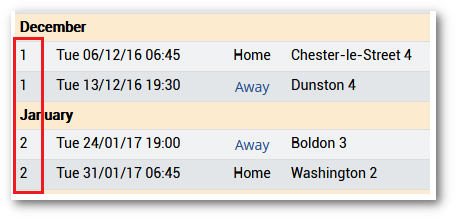
So a "Period 1 fixture" is associated with a "Period 1 Nomination List" and likewise a "Period 2 fixture" is associated with a "Period 2 Nomination List".
Creating Nomination Lists
When the fixtures are generated, the Active Nomination Period is set to 1. To create and change to a new Active Nomination Period, see Renomination.
|
|
Note: It is quite posible to only have one set of nomination lists and keep the Active Nomination Period as 1 for the whole league. This might be done if a league is small and there is simply no need for a renomination process. |
Frequently Asked Questions
No players are in the drop-down lists in Results
Entry
1) For there to be players in the drop-downs, a
club must have added players to their nomination list.
Solution: Check that nominations have been added.
2) As mentioned above, when the fixtures are initially added, the first half ones are associated with Period 1 and the second half ones are associated with Period 2. However, until the start of the period 2 fixtures in the 2nd half, so if you go to a period 2 fixture, there will be no players available yet.
Solution: Check if you are trying to add
players for a future period, and whether the renomination process has
been completed.
3) If a
fixture is moved into a different period to the one it was created with,
then while it might appear in the 1st half, say, it may actually be
associated with Nomination Period 2, so again, no players available yet.
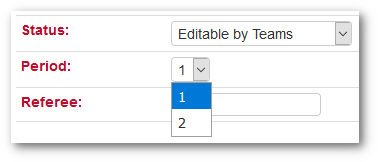
Solution: Using the administrative login, go to the fixture and change the Period.