Assuming that the Sport has been set as "Squash" in the Event setup, you can automatically obtain a player's level or ranking from SquashLevels, and then put your event entrants in the correct order:
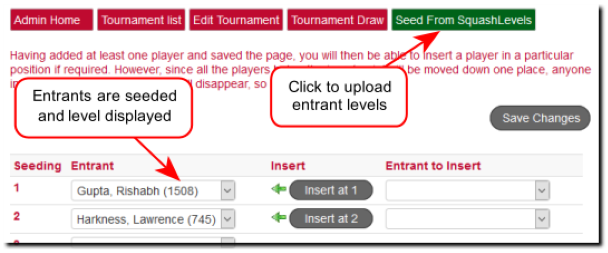
In order to do this, each player will need one of two things:
Have Existing League Master Connection to SquashLevels
You can add a player to League Master but until the player has had at least one result uploaded to SquashLevels, there will be no link between the two systems. However, once a result has been uploaded, SquashLevels will be able to automatically return the player ranking by clicking the Seed From SquashLevels link above.
SquashLevels ID
Running tournaments may will involve entrants who are not already on League Master so no existing link exists. However, by adding the unique SquashLevels ID the ranking can be read.
Although it is not promoted in a great way on the SquashLevels website, you can find a SquashLevels ID by searching for the player:
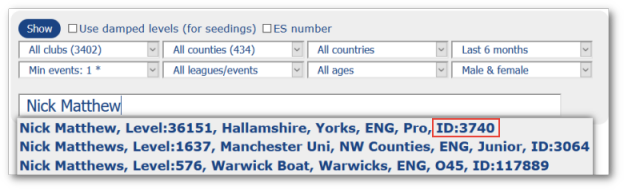
The SquashLevels ID is shown in the search results as above.
Adding SquashLevels ID
This requires two stages:
Enable the Fields
The Entrant Profile can show a wide range of fields, but not all of them are visible using the default settings. To ensure that the SquashLevels ID is visible, go to the Entry Fields page and enable "SLID".
Obtaining the SquashLevels ID
By far the easiest way is to use Online Entry for a tournament. In this way, having made the SLID field visible on the entry form (see above) each entrant will need to obtain their ID and then add it to the entry.
Alternatively, you can add it manually, either by asking entrants to add their SLID to whatever entry form you are using, or by adding it after an entry has been received. This can be done by going to the list of entrants and clicking on an entrant name. See Tour Entrants.
 |
Note: Results on SquashLevels can come from many different sources, and this can result in duplications. SquashLevels has a system for merging players but this means that a player SLID can change. It is best, therefore, to make sure that all entrants check their ID for any tournament entry. |
Connected Links